MS Word Complete

MS Word (Microsoft Word) is a Word Processing Software. It is used to create, write, edit, format,…

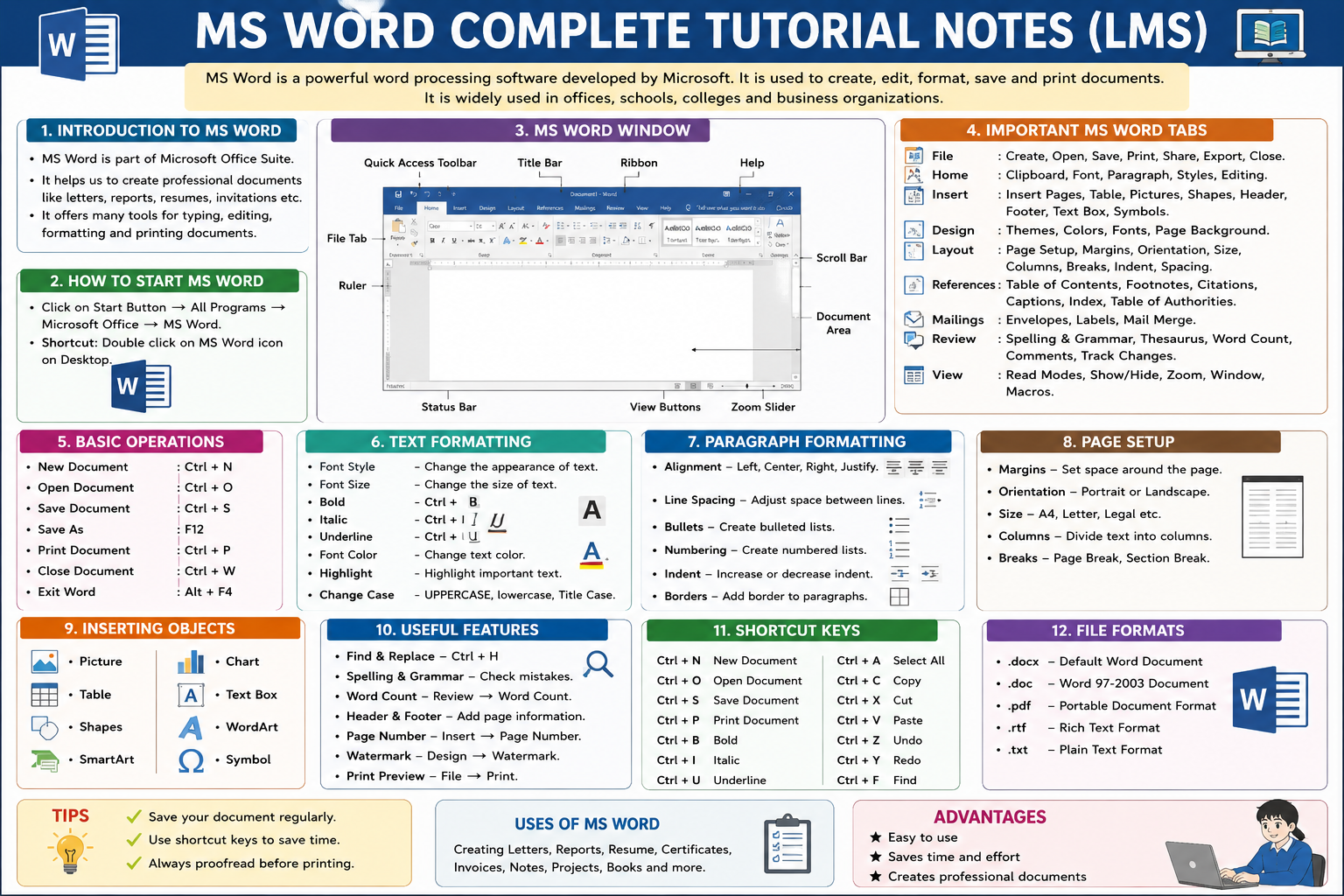
MS Word (Microsoft Word) is a Word Processing Software. It is used to create, write, edit, format, save, and print documents.

Course Curriculum

1. Introduction to MS Word
Microsoft Word (MS Word) is a word-processing application developed by Microsoft. It is used to create, edit, format, save, print, and share professional documents. MS Word is commonly used in schools, colleges, offices, businesses, government organizations, and homes.

  • 1. What is MS Word?
  • 2. How to Start MS Word?
  • 3. Parts of the MS Word Window
  • 4. Important MS Word Tabs
  • 5. File Tab
  • 6. Creating a New Document
  • 7.Opening an Existing Document
  • 8. Saving a Document
  • 9. Save As
  • 10. MS Word File Formats

Part 2 — Home Tab
Home Tab is one of the most important tabs in MS Word. It contains the basic tools used for editing and formatting a document. From the Home Tab, you can change font style, font size, text color, alignment, paragraph settings, bullets, numbering, and styles.

Part 3 — Insert Tab
The Insert Tab is used to add different types of objects to an MS Word document.

Part 4 — Design & Layout Tab
The Design & Layout Tab is used to customize the appearance, page setup, margins, orientation, size, themes, and overall layout of a document in MS Word.

Part 5 — References & Mailings
The References & Mailings Tabs are used to manage references, citations, tables of contents, footnotes, mail merge, envelopes, and labels in MS Word.

Student Ratings & Reviews

No Review Yet
No Review Yet
No Data Available in this Section